If you expect it to be flaky you could get one of those old school mechanical time switches with the clicky pegs (or a more modern digital equivalent) and just have it set to power down for 1 click, normally 15 mins, at 4am or whenever suits you - minimally technically complicated and guaranteed stability through planned instability!
- 0 Posts
- 13 Comments
Joined 2 years ago
Cake day: August 16th, 2023
You are not logged in. If you use a Fediverse account that is able to follow users, you can follow this user.
Thanks for the recommendation, will give that a further look.
I have played with Pinchflat as mentioned by another poster. I’ve found that some of the ones that aren’t on YouTube, you can use AudioBookShelf or similar in conjunction with a vpn set to a non core country for the podcast, you can either remove or at least greatly reduce the ad inserts.
Have an experiment with that, I use a gluetun docker and link my ABS docker to that.

 171·5 months ago
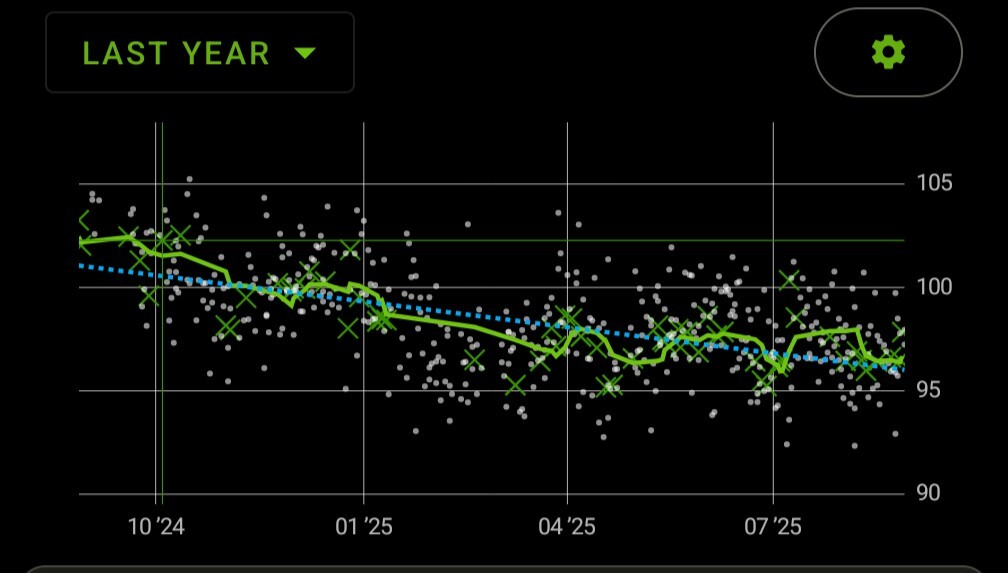 Here’s mine from Accubattery, running Graphene on Pixel 8 Pro
 2·6 months ago
You could look at doing a VPN only connection to your home server - some people use tailscale / headscale to achieve this but I’ve been happily using PiVPN on my home PiHole to provide full home server connectivity from anywhere for years.
This is not the time to be considering Calyx - Calyx website
 2·8 months ago
Its certainly doable, you just need to decide on where you want to start as a minimum viable product and tinker along as you go but ideally think far enough ahead about ideal situation so you don’t paint yourself into a corner and have to restart from scratch to get a certain outcome, although the Pi is pretty flexible for the power you’ll need.
I did this around 20 years ago (obviously not with a Pi back then) but as things changed I came round to the less hassle option of a phone and Bluetooth, particularly as I was often driving cars I couldn’t tinker with too much.
I had an implementation with a fold out 1 DIN touch screen which replaced the stereo and handled audio amplification etc and one with a stand alone hot plug 7" touchscreen. I had a reserve battery so that it stayed powered up for a short period of time after parking at home to do playlist and podcast synchronisation to my server in the house.
As other people have mentioned I was using Kodi and running audio from it as well as satnav etc. Mp3car was a good resource at the time.
 12·1 year ago
I am just a curious party on the internet and I’m looking on my phone so have done less deep digging than I would do at a desk.
Searching for Beko WMD service manual lead me to a site, elektrotanya.com where I got a file called beko_wmd_25121_t.rar which has exploded parts diagram and a fault code flowchart.
The flowchart says the following which may or may not be useful re resetting fault code.
FAILURE CODE OBSERVING MODE Entrance: Press the first auxiliary function button from the left for 6 seconds. “Run/ Pause/Cancel” led will start blinking and the program followers will start blinking as an error code for 3 seconds if any failure routine has run. After 3 seconds, the machine will return to the selection mode. Deletion of the error code: After entering the failure code observing mode, pressing and holding “Run/ Pause/Cancel” button for a short time will erase the error code from the memory. After you complete your inspection, if you are not sure that you have solved the problem and if you are going to change the electronic card group, do not erase the error code. For else cases, you may erase the error code.
The flow chart has details of the code flashings which I can give if helpful and you don’t acquire the document yourself.
Apologies if you’ve already tried something so simplistic and I totally get your frustration!
Yes, if I switch instance to world then its static. Thanks for your work, really love Voyager!
I’m on Android using Voyager 2.19.4 from 17th November, and its working for me
There’s an up to date list here - my specific problem were Lloyds group ones as mentioned on that page.
The parking app is paybyphone which I’ve only used a handful of times. Ringo which I normally have to use seems to work fine.
I’ve been transitioning over the last week or so, on a new 8 pro,which is the same dimensions as the 4.5 year old Samsung it replaced.
So far, I have two banking apps from the same UK provider that don’t work due to them checking the same flags as Google Pay (12 other banking apps I have work fine), one parking payment app that doesn’t work and I’ve been told uber has started to be glitchy with their latest update.
The work around for all of those (apart from Google Pay) is use them via the web browser where they are fine.
Do you use docker for anything else self hosted? You should give it a try. I literally had not heard of grocy till I read your post but I self host other things with docker. I googled them, visited their github looked at their docker instructions - theirs downloading a docker compose file and lsio’s which gave a run option rather than compose.
I pulled up an ssh to my server from my phone and literally entered the run command from here just modified to have my preferred storage path.
docker run -d \
  --name=grocy \
  -e PUID=1000 \
  -e PGID=1000 \
  -e TZ=Etc/UTC \
  -p 9283:80 \
  -v ~/.config/grocy:/config \
  --restart unless-stopped \
  lscr.io/linuxserver/grocy:latest```

I then opened my browser to http://ip:9283 and was prompted with a username and password. I googled and found out the default is admin/admin. I now have grocy temporarily running on my server. If I want to run it permanently I'd include it in my existing docker-compose stack or create a new one with just it in it.

I understand it's frustrating and you may not want to use grocy after all and someone might have a good alternative, but getting to terms with docker will make your self hosting life much easier - it took me longer to type this post than it took me to get grocy up and running with docker.
No experience of this specific model, but during the pandemic I bought a similar budget spin bike. Within the first few weeks, one of the crank arms (where the pedals attach) fell off so they replaced that part and a week or so later it happened again so they let me return it for a refund and I bought a Peloton that I’ve used multiple times every week since then.
The driver collecting it said they had lots of similar returns.
Looking on the Amazon reviews for your model, 509 reviews rated pedal strength as a negative with some reviewers talking about how they fell off.
If you plan to use it mainly as a coat hanger then it’s probably BIFL, but if you plan to ride it I’d say most likely not.
Peloton is a big commitment as it requires a subscription as well as the expensive hardware (although you may find a used one locally) but if you like it, the content can motivate and drive you.
Another poster mentioned Concept 2 and rowing - all the rowers in every commercial gym I’ve ever been in have been Concept 2, if you maintain them, in a home environment they can most definitely be BIFL.